Energy Load Forecasting > Using CygNet ELF > CygNet ELF EIE Editor > Configuring Meters and Input Owners > Viewing Historical Value Rollup Rules

Viewing Historical Value Rollup Rules

A meter group's gross forecast values can be assigned based on the rollup of the actual historical gas load values of the group's children.

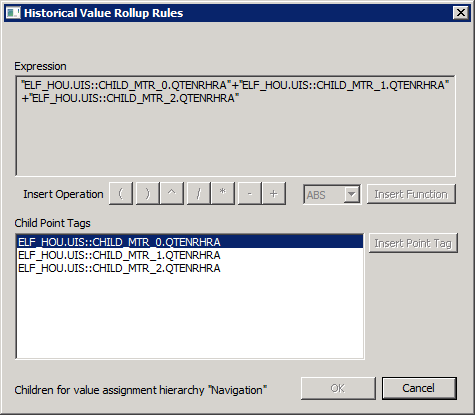
The dialog box displays the historical value rollup rule for the meter group. The expression represents a summation of the child gas load values. The point tags of the children in the hierarchy are shown in the Child Point Tags box.

The dialog box is read-only.

To View Rollup Forecast Rules

  1. Click the Meters/Owners page of the ELF Editor.
  2. Add a New Child or New Sibling, or double-click to Edit a configured meter.
  3. Configure the properties in the General page.
  4. Click the Assignments page.
  5. Click Rollup Forecast from the Value Assignment Type drop-down menu.
  6. Click Rollups to view the Historical Value Rollup Rules dialog box.

Historical Value Rollup Rules


Let us know how we can improve this topic.

CygNet at weatherford.com

© 2020 Weatherford. All rights reserved.